fluxer.eddycov package
Vector rotation conventions
The coordinates of a vector \(i\) in coordinate system \(k\), i.e. \(\vec{v}_{i,k}\), can be expressed in or transformed to a different coordinate system by multiplication with a rotation matrix \(R_n\) around axis \(n\). In a right-handed coordinate system, positive rotation of the coordinate system around a coordinate axis is clockwise when looking along rotation axis from the origin towards the positive direction. A single rotation around the \(x\), \(y\), or \(z\) axis is performed by pre-multiplying the corresponding rotation matrix:
by column vector \(\vec{v}_{i,k}\). For instance, rotating vector \(\vec{v}_{i,k}\)‘s coordinates from coordinate system \(0\) to coordinate system \(1\) around the vertical \(z\) axis is defined as:
This particular definition is known as “passive” or “alias” rotation. Alternatively, the same rotation can be achieved by post-multiplying the row vector \(\vec{v}_{i,k}\) by the inverse (or transpose, in orthogonal matrices such as these) of the rotation matrix in equation (1):
Using \(R_{z,\theta}\) instead of the inverted (transposed) matrix
results in what is known as an “active” or “alibi” rotation of the
vector in the opposite direction (i.e. counterclockwise using the
convention described above) in the same fixed coordinate system.
Equation (2) is computationally more convenient, as vector
data are typically acquired and stored in rows, so this is the convention
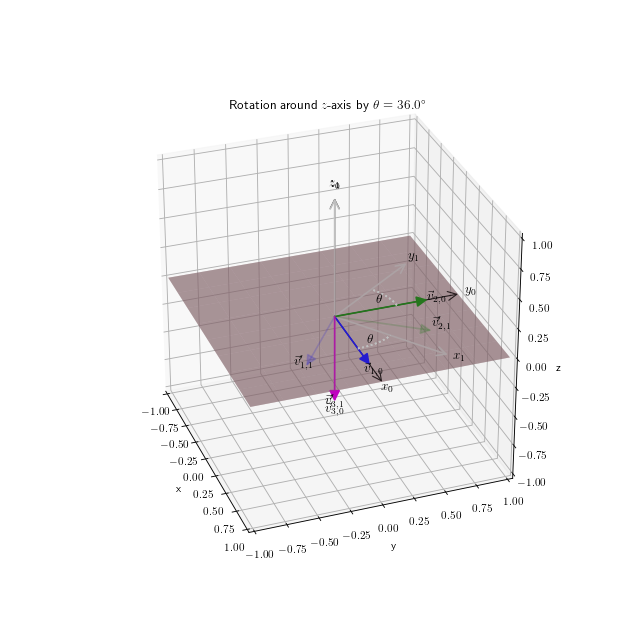
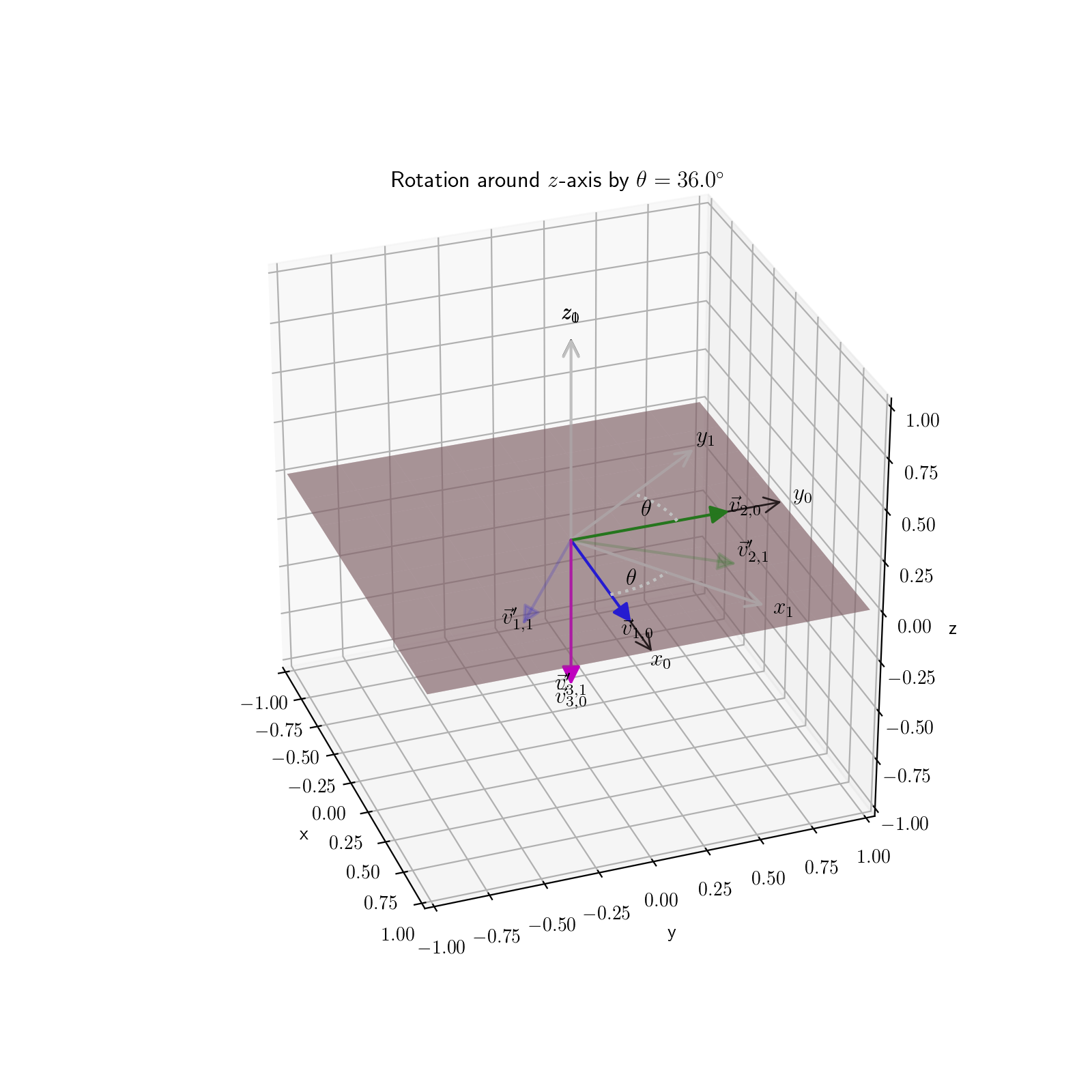
adopted in eddycov. Figure 1
illustrates this operation for a commonly used rotation to eliminate the
angular offset of an anemometer relative to the main longitudinal axis of
the platform where it was mounted.
(Source code, png, hires.png, pdf)
Module contents
Tools for eddy covariance analysis requiring motion correction
main |
Perform flux analyses, given a configuration file |
smooth_angle |
Smooth angles by decomposing them, applying a boxcar average |
planarfit |
Calculate planar fit coefficients for coordinate rotation |
rotate_coordinates |
Rotate vector coordinate system or vectors themselves around an axis |
rotate_wind3d |
Transform 3D wind vectors to reference mean streamline coordinate system |
wind3D_correct |
Correct wind vector measurements from a moving platform |
despike_VickersMahrt |
Vickers and Mahrt (1997) signal despiking procedure |
wind3D_correct_period |
Perform wind motion correction on period dataframe |
-
fluxer.eddycov.main(config_file)[source]¶ Perform flux analyses, given a configuration file
Parameters: config_file (str) – Path to configuration file. Returns: Writes summary file and prints messages from process. Return type: None
-
fluxer.eddycov.wind3D_correct_period(ec_prep, config, **kwargs)[source]¶ Perform wind motion correction on period dataframe
Parameters: - ec_prep (pandas.DataFrame) – Pandas DataFrame with prepared flux data.
- config (OrderedDict) – Dictionary with parsed configuration file.
- tilt_motion (numpy.array, optional keyword) – Passed to wind3D_correct.
- tilt_anemometer (numpy.array, optional keyword) – Passed to wind3D_correct.
Returns: wind corrected flux data.
Return type: pandas.DataFrame
-
fluxer.eddycov.smooth_angle(angle, vmagnitude=1, kernel_width=21)[source]¶ Smooth angles by decomposing them, applying a boxcar average
Smoothing is done by using a 1D kernel smoothing filter of a given width.
Parameters: - angle (numpy.ndarray) – The angle(s) in degree units.
- vmagnitude (numpy.ndarray, optional) – The magnitude array associated with each angle. It can be a scalar
that is common to all
angleelements. - kernel_width (int, optional) – The width of the filter kernel.
Returns: namedtuple with ndarrays
angleandmagnitude, in that order.Return type: namedtuple
-
fluxer.eddycov.planarfit(vectors)[source]¶ Calculate planar fit coefficients for coordinate rotation
See Handbook of Micrometeorology (Lee et al. 2004). Ported from getPlanarFitCoeffs.m from Patric Sturm <pasturm@ethz.ch>.
Parameters: vectors (numpy.ndarray) – A 2-D (Nx3) array with x, y, and z vectors, expressed in a right-handed coordinate system. These vectors may correspond to u, v, and w wind speed vectors, or inertial acceleration components. Returns: PlanarFitCoefs – namedtuple with (index and name in brackets): - numpy.ndarray [0, k_vct]
- 1-D array (1x3) unit vector parallel to the new z-axis.
- numpy.ndarray [1, tilt_coefs]
- 1-D array (1x3) Tilt coefficients b0, b1, b2.
- numpy.float [2, phi]
- Scalar representing roll angle \(\phi\).
- numpy.float [3, theta]
- Scalar representing pitch angle \(\theta\).
Return type: namedtuple
-
fluxer.eddycov.rotate_coordinates(vectors, theta, axis=2, **kwargs)[source]¶ Rotate vector coordinate system or vectors themselves around an axis
A right-handed coordinate system is assumed, where positive rotations are clockwise when looking along the rotation axis from the origin towards the positive direction. With the default
active=False, each row vector \(i\) in input coordinate system \(0\) is rotated around the given axis by angle \(\theta\), so that it can be expressed in coordinate system \(1\) as follows:\[\vec{v}_{i,1} = \vec{v}_{i,0} R_{\theta}\]where the input and output coordinate systems are different. If the input and output coordinate systems are the same, i.e.
active=True, the vectors are transformed according to:\[\vec{v}_{i,1} = \vec{v}_{i,0} R_{\theta}^\intercal\]Parameters: - vectors (array_like) – An nx3 array of vectors with their x, y, z components
- theta (numeric) – The angle (degrees) by which to perform the rotation.
- axis (int) – Axis around which to perform the rotation (x = 0; y = 1; z = 2).
- **kwargs –
Optional keywords
- active : bool
- Whether to return the coordinates of each vector in the rotated coordinate system or to rotate the vectors themselves onto the same coordinate system. Default is to perform a passive transformation, i.e. rotation of the coordinate system.
Returns: The vector array with the same shape as input with rotated components.
Return type: array_like
-
fluxer.eddycov.rotate_wind3d(wind3D, method='PF', **kwargs)[source]¶ Transform 3D wind vectors to reference mean streamline coordinate system
Use double rotation, triple rotation, or planar fit methods (Wilczak et al. 2001; Handbook of Micrometeorology).
This is a general coordinate rotation tool, so can handle inputs such as wind speed and acceleration from inertial measurement units.
Parameters: - wind3D (numpy.ndarray) – A 2-D (Nx3) array with x, y, and z vector components, expressed in a right-handed coordinate system. These may represent u, v, and w wind speed vectors, or inertial acceleration.
- method ({"DR", "TR", "PF"}, optional) – One of: “DR”, “TR”, “PF” for double rotation, triple rotation, or planar fit.
- k_vector (numpy.ndarray, optional) – 1-D array (1x3) unit vector parallel to the new z-axis, when “method” is “PF” (planar fit). If not supplied, then it is calculated.
Returns: RotatedVectors – namedtuple with (index, name in brackets):
- numpy.ndarray [0, rotated]
2-D array (Nx3) Array with rotated vectors
- numpy.ndarray [1, phi_theta]
1-D array (1x2) \(\phi\) and \(\theta\) rotation angles. The former is the estimated angle between the vertical unit coordinate vector in the rotated frame and the vertical unit vector in the measured uv plane, while the latter is wind direction in the measured uv plane. Note these are not roll and pitch angles of the measurement coordinate frame relative to the reference frame.
Return type: namedtuple
-
fluxer.eddycov.wind3D_correct(wind_speed, acceleration, angle_rate, heading, speed, anemometer_pos, sample_freq, Tcf, Ta, tilt_motion=array([0., 0.]), tilt_anemometer=array([0., 0.]))[source]¶ Correct wind vector measurements from a moving platform
This is a port of S. Miller’s
motionMatlab function, which implements Miller et al. (2008) approach. Coordinate frame is assumed to be right-handed:- x - positive towards the bow.
- y - positive towards port side.
- z - positive upwards.
Parameters: - wind_speed (numpy.ndarray) – A 2-D (Nx3) array with u, v, and w wind speed (m/s) vectors.
- acceleration (numpy.ndarray) – A 2-D (Nx3) array with x, y, and z acceleration (m/s/s) vectors.
- angle_rate (numpy.ndarray) – A 2-D (Nx3) array with angular rates (radians/s) vectors.
- heading (array_like) – A vector with ship heading measurements (deg) in right-hand coordinate system.
- speed (array_like) – A vector with ship speed (m/s).
- anemometer_pos (array_like) – [x, y, z] position vector of anemometer, relative to motion sensor (m).
- sample_freq (float) – Sampling frequency (Hz).
- Tcf (float) – Complimentary filter period (s).
- Ta (float) – High-pass filter cutoff for accelerations (s). This can be a scalar if the same cutoff is used for the three components, or a 3 element vector to indicate cutoff period for the x, y, z components.
- tilt_motion (array_like, optional) – [roll, pitch] vector with mean tilt (radians) relative to a horizontal plane. Roll angle offset is positive is port side up, and pitch is positive for bow down (see Miller 2008 for info, set to [0 0] if unknown).
- tilt_anemometer (array_like, optional) – [roll, pitch] vector with mean tilt (radians) relative to a horizontal plane. Roll angle offset is positive is port side up, and pitch is positive for bow down (see Miller 2008 for info, set to [0 0] if unknown).
Returns: CorrectedWind3D – namedtuple with (index, name in brackets):
- numpy.ndarray [0, uvw_ship]
2-D array (Nx3) with corrected wind vectors in ship-referenced frame with z-axis parallel to gravity.
- numpy.ndarray [1, euler_angles]
2-D array (Nx3) with Euler angles.
- numpy.ndarray [2, euler_angles_angular_rates]
2-D array (NX3) with Euler angles from rate sensors (unfiltered).
- numpy.ndarray [3, euler_angles_accelerations]
2-D array (NX3) with Euler angles from accelerometers (unfiltered).
- numpy.ndarray [4, euler_angles_slow]
2-D array (NX3) with slow Euler angles (low pass filtered).
- numpy.ndarray [5, euler_angles_fast]
2-D array (NX3) with fast Euler angles (high pass filtered).
- numpy.ndarray [6, mount_offset_rotations]
2-D array (3X3) with mounting offset rotation matrix (see Miller 2008).
- numpy.ndarray [7, uvw_earth]
2-D array (NX3) with measured velocity, rotated to the earth frame.
- numpy.ndarray [8, uvw_angular]
2-D array (NX3) with velocity induced by angular motion.
- numpy.ndarray [9, uvw_linear]
2-D array (NX3) with velocity induced by platform linear motion.
- numpy.ndarray [10, ship_enu]
2-D array (NX3) with ship velocity in eastward, northward, up frame. (low pass filtered).
- numpy.ndarray [11, uvw_enu]
2-D array (NX3) with corrected wind in eastward, northward, up frame.
- numpy.ndarray [12, imu_enu]
2-D (NX3) array with displacement of the motion sensor.
Return type: namedtuple
References
- Miller,S.D., Hristov,T.S., Edson,J.B., and C.A. Friehe, 2008:
- Platform Motion Effects on Measurements of Turbulence and Air-Sea Exchange Over the Open Ocean, J. Atmo. Ocean. Tech. 25(9), 1683-1694, DOI: 10.1175/2008JTECHO547.1.
-
fluxer.eddycov.despike_VickersMahrt(x, width, zscore_thr, nreps, step=None, nrep_thr=None, interp_nan=True)[source]¶ Vickers and Mahrt (1997) signal despiking procedure
The interpolating function is created by the InterpolatedUnivariateSpline function from the scipy package, and uses a single knot to approximate a simple linear interpolation, so as to keep the original signal as untouched as possible.
Parameters: - x (numpy.ndarray) – A 1-D signal vectors to be despiked.
- width (int) – Window width.
- step (int, optional) – Step size for sliding windows. Default is one-half window width.
- zscore_thr (float) – The zscore beyond which an observation is considered to be an outlier. Default is zero.
- nrep_thr (int, optional) – The maximum number of consecutive outliers that should occur for a spike to be detected. Default: 3.
- nreps (int, optional) – How many times to run the procedure. Default is zero.
- interp.nan (bool, optional) – Whether missing values should be interpolated. Interpolated values are computed after despiking. Default is True.
Returns: VickersMahrt – Tuple with (index, name in brackets):
- numpy.ndarray [0, x]
1-D array with despiked input.
- numpy.int [1, nspikes]
Number of spikes detected.
- numpy.int [2, ntrends]
Number of outlier trends detected.
- numpy.int [3, kclass]
Number of iterations performed.
Return type: tuple
Submodules
parse_ecfile
Parse and flag input eddy covariance file
-
exception
fluxer.eddycov.parse_ecfile.FluxError[source]¶ Bases:
exceptions.ExceptionBase class for Exceptions in this module
-
exception
fluxer.eddycov.parse_ecfile.SonicError(message, flags)[source]¶ Bases:
fluxer.eddycov.parse_ecfile.FluxErrorCritical sonic anemometer Exception
Bases:
fluxer.eddycov.parse_ecfile.FluxErrorCritical navigation Exception
-
exception
fluxer.eddycov.parse_ecfile.MeteorologyError(message, flags)[source]¶ Bases:
fluxer.eddycov.parse_ecfile.FluxErrorCritical meteorology Exception
-
fluxer.eddycov.parse_ecfile.prepare_period(period_file, config)[source]¶ Parse input period file and set up data for flux analyses
Parameters: - period_file (str) – Path to file with pre-filtered, candidate, flux data.
- config (OrderedDict) – Dictionary with parsed configuration file.
Returns: Tuple of two
pandas.DataFrameobjects; first represents prepared flux data, and the second the flags encountered during tests. The latter is also passed along with exception, if raised.Return type: tuple
settings
Basic flags and objects required throughout the package
-
fluxer.eddycov.settings.FLUX_FLAGS= ['failed_prep_flag', 'open_flag', 'closed_flag', 'sonic_flag', 'motion_flag', 'bad_navigation_flag', 'bad_meteorology_flag']¶ Flags used during processing
tilt_windows
Calculate tilt angles in flux files using non-overlapping moving windows
-
class
fluxer.eddycov.tilt_windows.TiltWindows(ec_files=[], win_minutes=0)[source]¶ Well-defined pandas DataFrame